Synergy 10 Data Capture Terminal - Error Messages Solutions
SynergyAlso covers: Synergy 5 Data Capture Terminal - Error Messages Solutions
If you are using the Synergy 10 device and you come across an error message, there may be solutions to it that you can apply before contacting support. Please look at the guide below.
The terminal reboots itself without any voice prompt when it starts
Caused by: During a firmware upgrade, some files may not be properly copied over
Solution: Please contact your supplier for a new firmware update file
When a user is identifying themselves at the terminal it reboots itself
Caused by: The photograph held on the database may be too large
Solution: Reduce the file size of the photograph
Terminal does not communicate to the network
Caused by: Faulty cable or switch. Network parameters are incorrectly set. RJ45 component failure. Wifi connection weak/bad.
Solution: Check network cables and switches are OK then check the green and yellow lights are flashing on the RJ45 port. If the yellow light is flashing but not the green light then there should not be an issue with the terminal and it is likely a network setting issue. If neither light is flashing it may be a component failure and please contact your supplier. Wifi: check what Wi-Fi the device is connected to and see if it is working with another device. You may need to exit the Synergy App to do so if you aren't sure of this. You can exit the app by entering the Admin details and clicking 'close app':
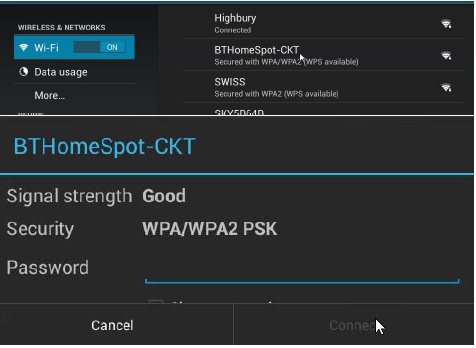
- Wi-Fi Network
- From home screen, go to Application and then settings
- Select Wi-Fi network you want to connect and insert passphrase and click Connect
- Make sure the device is connected
Terminal crashes but recovers when restarted
Caused by: The power cable is not inserted correctly, or the internal memory is full.
Solution: Ensure the power cable is plugged into the device correctly. If so, restore the terminal to the factory setting.
The terminal does not start, or it crashes on start-up.
Caused by: The SD card has failed, or the data has corrupted
Solution: Format the SD card or replace it.