
SQUID - Some persons don't have Squid Card and Purse details imported
SQUID - Some persons don't have Squid Card and Purse details imported
The condition may exist where there are some persons who don't have Squid Card or Purse imported from Squid.
This may be that they have been imported before but then removed from SWF or changed to a non Diner.
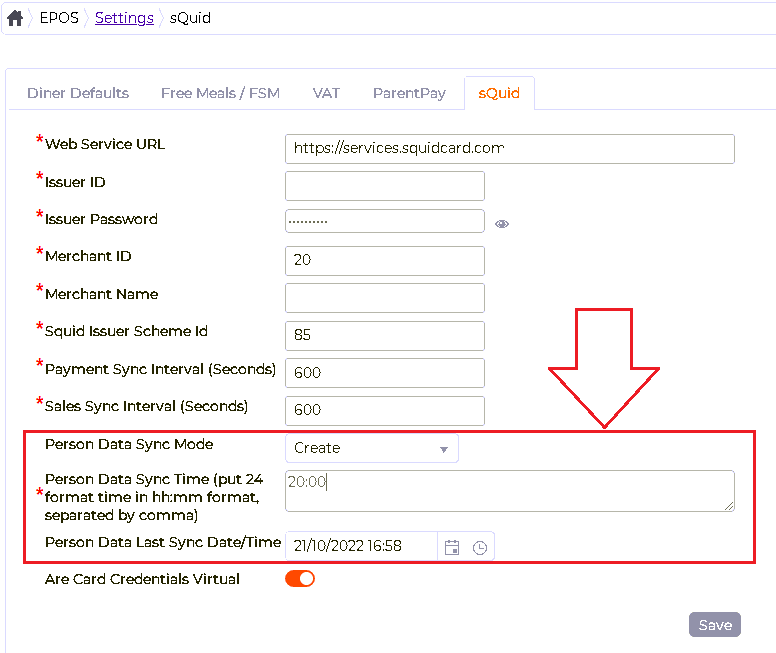
To resolve this go to EPOS > Settings > sQuid in SWF
Make sure that the 'Person Data Sync Mode' is set to Retrieve
Set the sync time to a few mins in the future.
Set the 'Person Data Last Sync Date/Time' to be blank, i.e. delete whatever is in the field.Save
Then restart the Squid Sync service
Wait for the sync to take place.
Then reset the sync time to be the usual time and if necessary the 'Person Data Sync Mode' then restart the service again.
NOTE: The Person MIS User ID MUST match the Squid Ext Ref within Squid, only Squid themselves can confirm the Ext Ref for a person.
The condition may exist where there are some persons who don't have Squid Card or Purse imported from Squid.
This may be that they have been imported before but then removed from SWF or changed to a non Diner.
To resolve this go to EPOS > Settings > sQuid in SWF
Make sure that the 'Person Data Sync Mode' is set to Retrieve
Set the sync time to a few mins in the future.
Set the 'Person Data Last Sync Date/Time' to be blank, i.e. delete whatever is in the field.Save
Then restart the Squid Sync service
Wait for the sync to take place.
Then reset the sync time to be the usual time and if necessary the 'Person Data Sync Mode' then restart the service again.
NOTE: The Person MIS User ID MUST match the Squid Ext Ref within Squid, only Squid themselves can confirm the Ext Ref for a person.