
Card Management
Card Management screen allows managing single or multiple cards allocated to each individual employees, staff and visitors in the system

Add Card
Click on icon, user will give 3 options:
1. Employee Card
2. Visitor Card
3. Security Card
Select the relevant option
Employee Card - will give you option to select employee from drop down option

Visitor and Security Card - will give you option to insert First and Last name
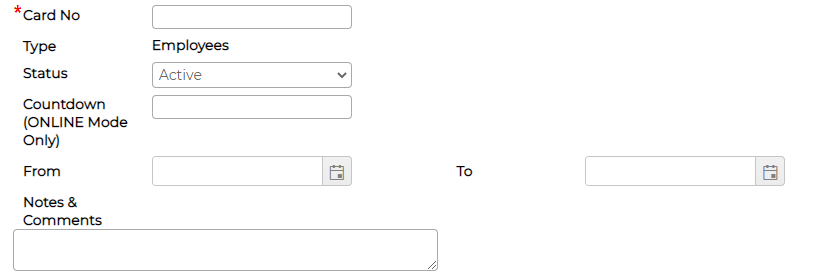
Next insert the card no, From and to date, select the relevant status, insert notes and comments (optional) and click save
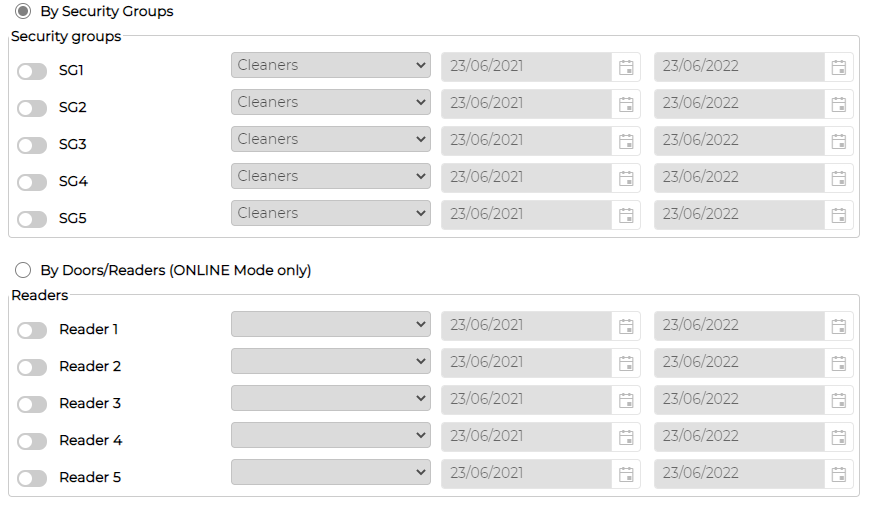
If Access Control Module enabled and setup, you will get additional option below to add security group information and the validity and click save
Requires additional module - Access Control
Edit Card
Click on icon against the item to edit the card details as required.
Delete Card
Click on icon against the item to delete the card details.
Card Status
Card status can be changed manually if required
Active - Card is Active
Block Card - Either manually change the status of card as blocked or system will automatically change the card status to block after the end date
Stolen Card - Edit the record and mark the relevant card status as Stolen.
Countdown - Only applicable with Access Control module and when devices are communicating to server in an ONLINE mode.
Depending on the set value, system will automatically block the card when it reaches the swipe amount equal to set value
Add Card
Click on
icon, user will give 3 options:1. Employee Card
2. Visitor Card
3. Security Card
Select the relevant option
Employee Card - will give you option to select employee from drop down option
Visitor and Security Card - will give you option to insert First and Last name
Next insert the card no, From and to date, select the relevant status, insert notes and comments (optional) and click save
If Access Control Module enabled and setup, you will get additional option below to add security group information and the validity and click save
Requires additional module - Access Control
Edit Card
Click on
icon against the item to edit the card details as required.Delete Card
Click on
icon against the item to delete the card details.Card Status
Card status can be changed manually if required
Active - Card is Active
Block Card - Either manually change the status of card as blocked or system will automatically change the card status to block after the end date
Stolen Card - Edit the record and mark the relevant card status as Stolen.
Countdown - Only applicable with Access Control module and when devices are communicating to server in an ONLINE mode.
Depending on the set value, system will automatically block the card when it reaches the swipe amount equal to set value