Using cards or fobs on the Face terminals
SynergyUsing cards/fobs on Synergy Face
Issue: When cards/fobs details are updated on the Synergy Workforce, it is not synced with the face terminals.
Response on the device: The cards/fobs details added on the Synergy Workforce tried to sync to the terminals during the overnight sync, but fails to update the devices and goes into a continues sync loop on the terminals. The message displayed on the terminals every other minute is 'Downloading Users' and causing issues for employees in register their scans.
Reason: The card/fob numbers where already present in the device against another employees (maybe a leaver, inactive or non-permitted employee) and the new details updated against the card number was unable to sync to the device. Hence, fell in a sync loop within all the face devices connected on the site.
Steps to be followed, when using cards/fobs on Face terminal
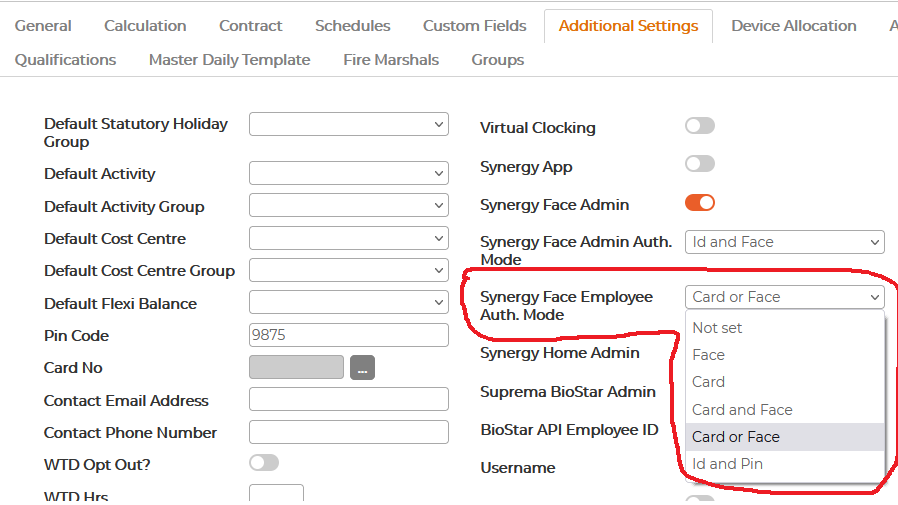
On the Synergy Workforce Menu Personnel Additional Settings Synergy Face Employee Auth.Mode must be set to the following:
- Card If employee is using only card to register the scans on the terminal
- Card & Face If employee is using two step of authentication, where is card is swiped first and then face is recognised.
- Face If employee is using only face to register the scans on the terminal
- Card or Face If employee is using only one of the option, either card or face but have been provided with the fob as well.
If any of the authentication mode defined is interchanged, the card/fob details, will not be synced to the terminals.
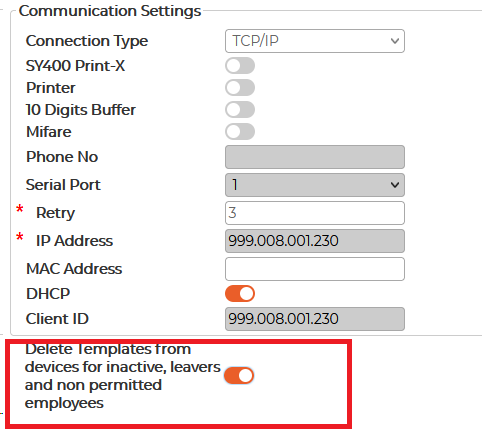
On Synergy Workforce Menu System Setup Devices Against each device there is an option called 'Delete Templates from devices for inactive, leavers and non-permitted employees'. If this option is turned ON, the device will automatically delete the templates of the leavers, inactive or non-permitted employees and if the customer reassigns the cards/fobs details to another new starter, it will be synced to the terminals without any issue.