Setup Active Directory on Local Installation
Its very old Article. So not guaranteed 100% it will work
- Change web.config to set up Windows authentication and authorization
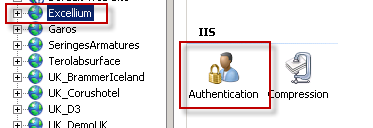
<authentication mode="Windows" /> <authorization> <deny users="?"/> </authorization> - Make sure that Windows Authentication is enabled for IIS on the server
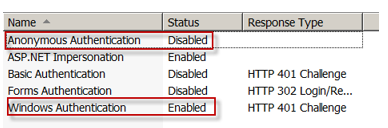
- Enable Windows Authentication and disable Anonymous access for corresponding site
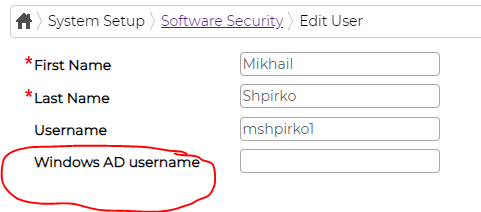
- Set the value for Windows username in Security tab of employee edit screen. Please note that only username part is used, so DO NOT put "MyDomain\userName" or "username@MyDomain". Just use "username" instead:
- Set up browsers to support straight-though authentication
- a. Internet Explorer - IE will try to send current credentials only to a site that is considered to be Local Intranet. Otherwise the user will be presented with a standard Windows prompt to enter username and password. in the status bar indicates that the site is considered to belong to Internet zone. So if you see that the URL is treated as Internet you should go to Tools -> Internet options -> Security -> click on Local Intranet -> Sites -> Advanced -> click on Add button, close all the screens and after that reload the page.
- b. Mozilla Firefox - just as IE, Firefox will only pass Windows credentials to selected sites, otherwise it would display a prompt for username and password. In order to enable straight-through authentication follow the instructions:
- i. Open Firefox
- ii. In the address bar type: about:config
- iii. Firefox 3.x and later requires you to agree that you will proceed with caution.
- iv. After the config page loads, in the filter box type: network.automatic
- v. Modify network.automatic-ntlm-auth.trusted-uris by double clicking the row and enter http://EduRegUrl in the prompt
- vi. Restart browser
- c. Google Chrome will behave in the same manner as the other two browsers. However it will use the settings of Internet Options (see above for IE) to check if the site is in Local Intranet zone.
If domain user provided for authentication does not have any mappings in the database standard login screen will be shown.