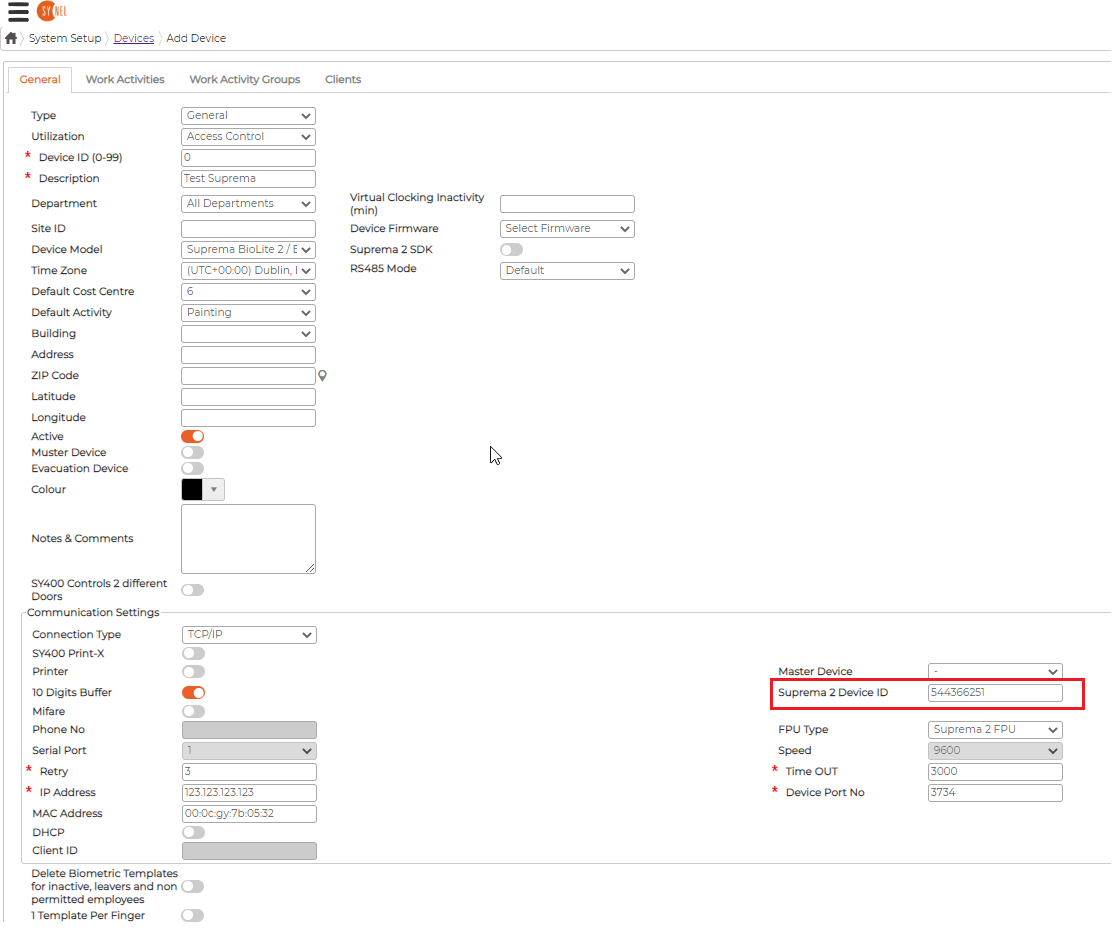
Suprema Biolite 2 setup IP Address and ID Number
SupremaThe id can be the same for all terminals, leave them set to 0
The IP's don't matter at all and they could all be different and not be the real IP as long as they are defined in the dll config
What matters and makes the link is the Suprema 2 Device ID and that's unique to the device.
The service is working in pulling model only, we don't send anything to the device, the device is always calling us. Our processing of device swipes is built on top of so-called buffers. When a swipe is received from a device, a buffer which encodes swipe details in a specific and strict format is generated and a processing DLL is called passing that buffer. A buffer looks like this:
The part highlighted in yellow is the IP address, and the part highlighted in Red is the Device ID. Please note, the Device ID is not the device's auto-generated database Id.
As you can see, we have a single character reserved to encode the Device ID. If the Device ID is equal or greater than 10, then we must encode it as a different character in order to make it a single character. For example:
- 10 ->: (colon)
- 11 ->; (semicolon)
- 12 -> <
- 13 -> =
- .. so on
The IP address and Device ID are used to identify the device in the client's database. If a single IP address is used for all devices, then they must have distinct Device IDs to be identified properly.
Currently, in Access Control swipe processing, we support Device IDs in a range of 0-31. If the Device ID is greater than 31, then it is fallen back to 0.