
Adjustments
System allows creating various adjustments that can be used manually to approve/add/delete hours against the employees

Add Adjustment
Click on the icon to add a new adjustment
Click on icon against the adjustment to edit parameters Delete Adjustment
Click on icon against the adjustment to delete.
System will not allow deleting adjustment if it is currently in use or have been used in past. You may make the adjustment inactive if not in use
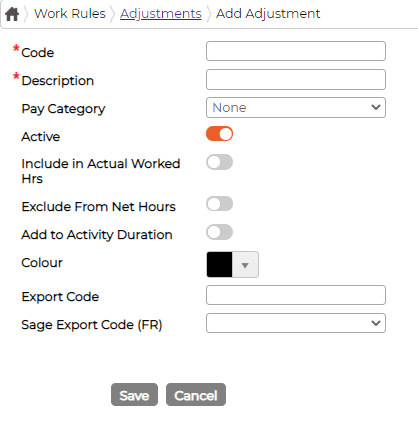
Add Adjustment
Click on the
icon to add a new adjustment - Code - Insert code manually or CTRL + F5 to auto generate unique code
- Description - Provide description
- Pay Category - Select pay category from the drop-down menu if applicable
- Active - Switch ON/OFF
- Depending on calculation conditions:
- Tick or un-tick "Include in Actual Hours"
- Tick or un-tick "Exclude from Net Hours"
- Add to Activity Duration - Applicable to Activities module only.
- Colour - Select default colour for the item
- Export Code - Add the export code (optional)
- Sage Export Code (FR) - Select the export code
Click on
icon against the adjustment to edit parameters Delete AdjustmentClick on
icon against the adjustment to delete.System will not allow deleting adjustment if it is currently in use or have been used in past. You may make the adjustment inactive if not in use