Synergy A - Troubleshooting Checklist
SynergyThere are many ways to ensure that your machine is up and running and doesn't need further assistance to fix it. Here are common issues that can be fixed with a few simple steps.
Network troubleshooting solutions
Check that the Network cable is plugged into the port labelled 'ETHERNET' underneath the clock. Also check the other end is plugged into a live network point. This is a common accident that customers face, not connecting the cable to the right port can prevent your machine from turning on.
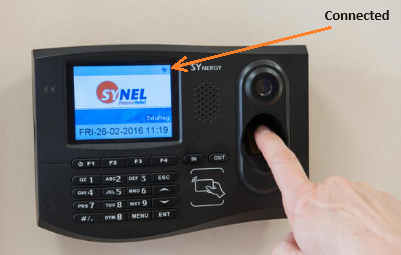
Confirm if the Globe symbol appears in the top-right corner. If so, this means the clock is connected to the server. If there is no globe then that is the issue that is affecting the way your machine works. The image above shows a globe in the top-right corner.
Rebooting your device
Disconnect the PoE (Power over Ethernet injector) for 5 minutes and then plug back in. Doing this will reboot your machine which should allow it to work as normal again.
During these troubleshooting processes if there are error messages and you need further assistance from one of our team be sure to include images and videos as that could help with solving the problem.
Here are other steps you should take to ensure you have the right information ready to give to support:
- Can employees clock in and out on the clock or is the power completely off on the clock?
- Check that the power is live.
- Confirm the firewall is configured to allow outbound traffic on TCP Port 443.
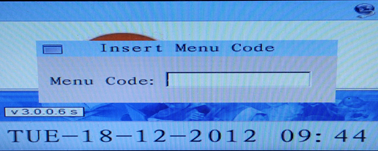
- Using the manager code (this will have been shared with you at installation - please speak to your system administrator if you do not know it), go to Info / UIN and confirm all IP Details. (F1 > Manager Code > ENT > Select 3-Info / Pin Punch > Select 1-TCP/IP Configuration and F1 > Manager Code > ENT > Select 4-UIN / Version > Select 1-Show UIN/Firmware Version).
Synergy/A devices are connected to the internet directly and require uninterrupted access to the internet via CAT5 network cable. They are powered via a 240v plug in transformer to 12V DC or via the network CAT5 cable with Power Over Ethernet (POE)