SY910 Facial Recognition Device - Error Messages Solutions
SY910, TLWIf the SY910 facial recognition device shows a message at a swipe, this guide explains what it means and whether the swipe was recorded, before you contact support. TLW stands for TimeLogWeb, the middleware that manages the time and attendance data.
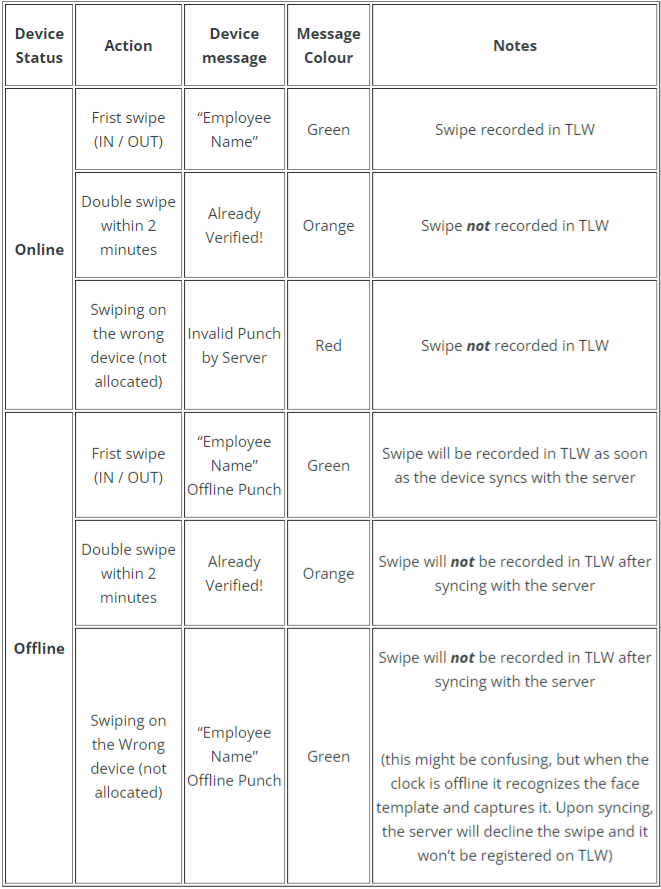
The message and its colour depend on whether the device is online or offline at the time of the swipe.
| Device status | Action | Device message | Colour | Result |
|---|---|---|---|---|
| Online | First swipe (IN or OUT) | The employee's name | Green | Swipe recorded in TLW |
| Online | Double swipe within 2 minutes | Already Verified! | Orange | Swipe not recorded in TLW |
| Online | Swiping on the wrong device (not allocated) | Invalid Punch by Server | Red | Swipe not recorded in TLW |
| Offline | First swipe (IN or OUT) | The employee's name, then Offline Punch | Green | Swipe is recorded in TLW once the device syncs with the server |
| Offline | Double swipe within 2 minutes | Already Verified! | Orange | Swipe is not recorded in TLW after syncing |
| Offline | Swiping on the wrong device (not allocated) | The employee's name, then Offline Punch | Green | Swipe is not recorded in TLW after syncing. While offline the device recognises the face and captures the punch, but on syncing the server declines it, so it is not registered. |
Some issues can only be cleared by an engineer call-out.