
Import Car No. Plates
Access Control Module with ANPR must be setup and enabled prior to importing Car No. PlatesGo to Menu - System Setup - Import Data and select table - Car No. Plates
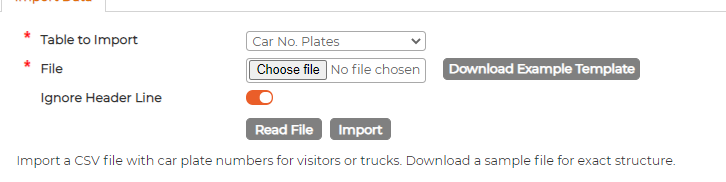
Download the example template and fill in the data as required

Import File to Synergy Workforce
On Successful reading, bottom section should show all information in Green colour.
Scroll down the page to make sure there are no lines with red colour in it.
If all looks good, click on Import button and wait until it finishes uploading data.
This can take a while so please be patient. Browser will continue to show loading icon until the import has been completed.
Download the example template and fill in the data as required
Import File to Synergy Workforce
On Successful reading, bottom section should show all information in Green colour.
Scroll down the page to make sure there are no lines with red colour in it.
If all looks good, click on Import button and wait until it finishes uploading data.
This can take a while so please be patient. Browser will continue to show loading icon until the import has been completed.