
Server Matching for Suprema devices using cards and access control
SupremaServer Matching for Suprema XPass devices (only using cards and access control)
Implemented Server matching for Suprema devices using cards and access control. The following device types are supported:
The local installation package is available via FTP at /TLW/Installers and upgrades/For testing only/v5.11.0.220124.1143.zip
The following components are required to be updated:
update Devices set SupremaIsServerMatchingEnabled = 1where IsActive = 1 and IsDeleted = 0 and UseBioStar2SDK = 1
Implemented Server matching for Suprema devices using cards and access control. The following device types are supported:
- Xpass S2,
- XPass D2,
- Xpass,
- XPass 2
The local installation package is available via FTP at /TLW/Installers and upgrades/For testing only/v5.11.0.220124.1143.zip
The following components are required to be updated:
- Website (Horio Web)
- Suprema service (Horio Web New Suprema Biolite Service)
- Database - execute SQL scripts
- Version scripts - starting with the version that corresponds to currently installed SWF version until and including 5.11.0
- Localization - 198.5.Additional localization.sql and 203.en-GB.sql
- Add the following setting in <appSettings> section to SupremaNewControllerService.exe.config
<add key="EnableServerMatching" value="True"/> - Go to System Setup -> Devices -> Edit Device and enable the following option:
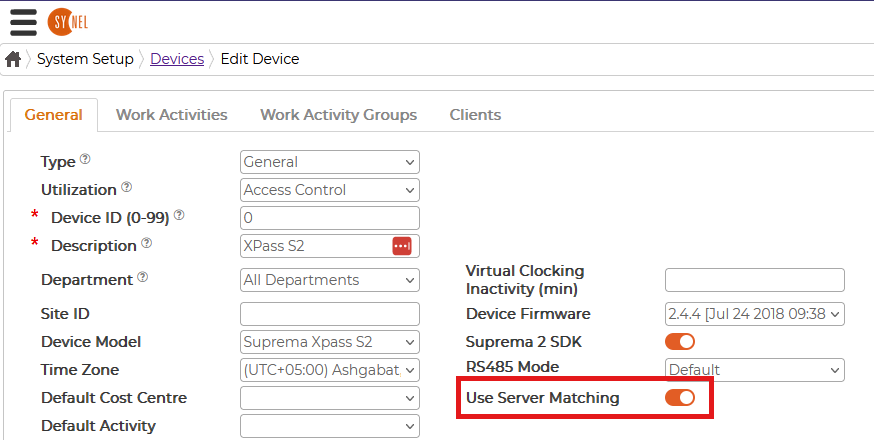
This option will be shown only for supported devices. - Start the service
update Devices set SupremaIsServerMatchingEnabled = 1where IsActive = 1 and IsDeleted = 0 and UseBioStar2SDK = 1