
Label Printer Setup and Troubleshooting
Compatible Label Printer - Brother QL-820NWB
Go to System setup - Devices
Edit the existing Visitor Kiosk device that you would like to attach the Printer

Go to Visitor Printer Settings Tab
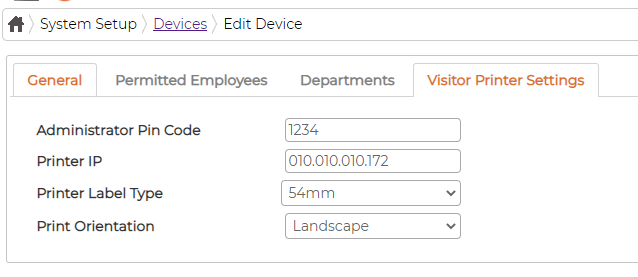
Administrator Pin Code - applicable to Visitor Kiosk admin icon
Printer IP - Must match the IP defined on the Printer Printer must be allocated Static IP address so that it doesn't change on next reboot Printer Label Type - Must match the label cassette loaded in the printer
Print Orientation - Default Landscape
Troubleshooting the Printer/Label
Go to System setup - Devices
Edit the existing Visitor Kiosk device that you would like to attach the Printer
Go to Visitor Printer Settings Tab
Administrator Pin Code - applicable to Visitor Kiosk admin icon
Printer IP - Must match the IP defined on the Printer Printer must be allocated Static IP address so that it doesn't change on next reboot Printer Label Type - Must match the label cassette loaded in the printer
Print Orientation - Default Landscape
Troubleshooting the Printer/Label
- Printer and Tablet are not on the same Wi-Fi network
- Printer IP not matching to the device settings in GUI.
- Label size not matching with device Settings in the GUI
- Printing options not set on the Visitor’s settings screen in GUI.
- Label design not attached to the visitor type in Visitor’s Settings in GUI
- Label design template size not matching with printer cassette loaded
- Label roll not adjust properly.
- Wrong roll type error message on Printer – settings on printer Template mode set to ON; it must be OFF.
- Weak or unstable Wi-Fi network either on Kiosk tablet or Printer