Card reader mode Mifare
Issue: Mifare card reader has changed the mode.
Troubleshooting
- When check card ID in Notepad alfanumeric card ID is displayed,
- Newly added Card ID differs from one added in the system and one displayed in Events screen.
To reset mode on the Mifare Card reader:
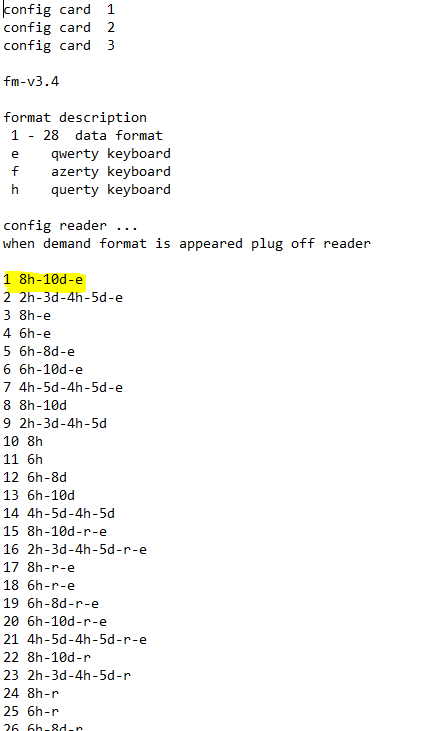
Open Notepad or Word document, connect card reader to computer. Tap configuration card 3 times. This will start device setup. It will run through all 31 available modes. As soon as you see your mode on the screen disconnect card reader. In case it has been missed to disconnect card reader on required mode - wait till required mode will appear on the screen next time. Device goes through modes in a loop till device is disconnected.
we use the first mode -> marked yellow below. next time connecting reader it will have correct mode.
How it looks when card reader mode is setup.