ER2 - Upgrading EduReg after SIMS version release
ER2Also covers: Upgrading EduReg after SIMS version release
Upgrading EduReg after SIMS version release
how to upgrade the EduReg Installation following a SIMS version release.
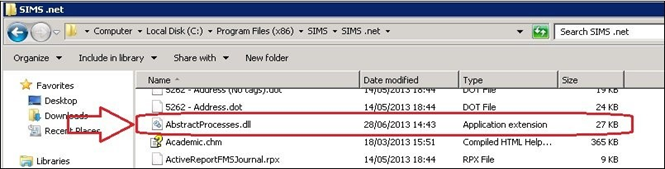
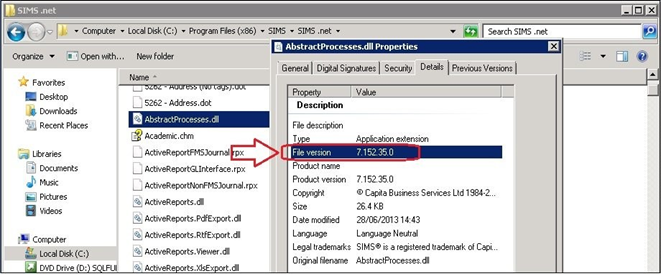
Following a SIMS version release the version of the SIMS client on the EduReg server will need to be checked to ensure that the client has also been upgraded to match the SIMS server before proceeding with the upgrade detailed below.
- Navigate to the SIMS client folder on the EduReg server which is usually located
C:\ProgramFiles (86)\SIMS\SIMS.net\
SIMS version update utillity
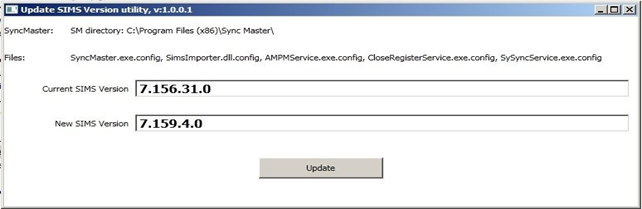
Utillity to update the SIMS version in all the config files required.
- Locate the following file in the EduReg2\Utilities folder SIMSVersionUtility.exe
- Run SIMSVersionUtility.exe
- The current version will be shown in the field 'Current SIMS Version'
- Enter the new update version of SIMS in the field 'New SIMS Version'
- Click Update
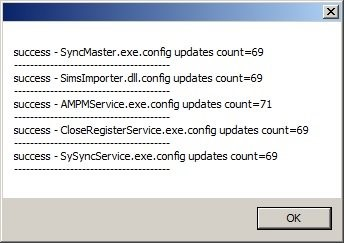
- Check the 'Success' pop up that all files have been updated
Once this has been done and all the files saved, restart the following Windows services. (not all dll.config files and services will be present on every system)
- AMPMservice
- CloseRegisterService
- SySyncService