
How to configure Synergy Workforce to Allocate Swipe to previous date
AHR 0000-0830 has the following night shift configuration
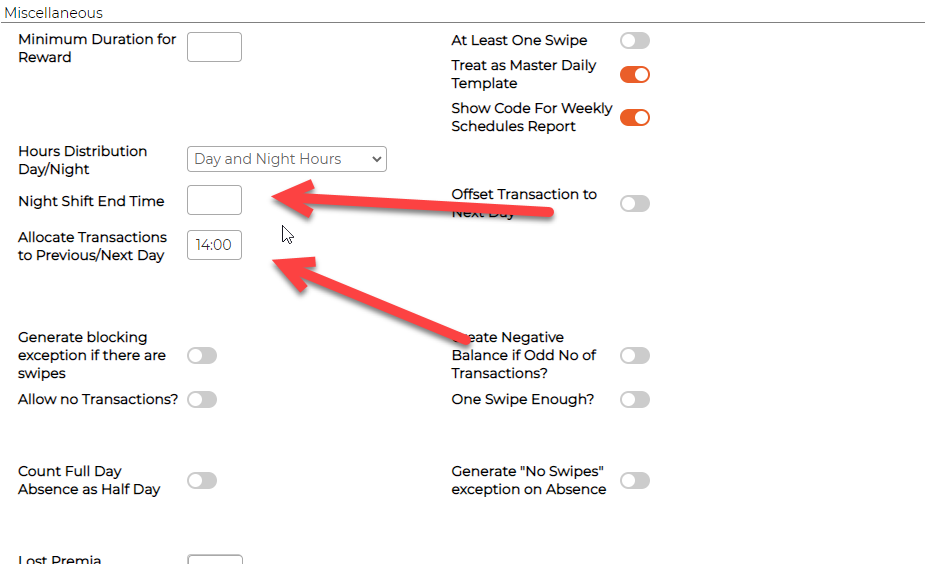
"Allocate Transactions to Previous/Next Day" works as follows:
Given the swipe on 04/02/2023 00:04
When there are no swipes for 04/02/2023
When there is a swipe on 03/02/2023
When Allocate Transactions to Previous/Next Day is set for daily template on 03/02/2023
Then
- time of first swipe on 03/02/2023 will be taken
- time of current swipe (04/02/2023 00:04) will be compared to first swipe on 03/02/2023 + value Allocate Transactions to Previous/Next Day
- if in the range, then 04/02/2023 00:04 will be allocated to 03/02/2023
Example:
Existing Swipes:
03/02/2023 22:00
03/02/2023 23:30
03/02/2023 23:45
Allocate Transactions to Previous/Next Day for daily template on 03/02/2023 is 14:00
new swipe:
04/02/2023 00:04
Calculation:
03/02/2023 22:00 + 14:00 = 04/02/2023 12:00
04/02/2023 12:00 > 04/02/2023 00:04
04/02/2023 00:04 will be allocated to 03/02/2023
in the current case, there were no swipes on 03/02/2023. Therefore, swipe was allocated on the same date.
To make the provided example work for the customer, Night Shift End Time should be used.
Night Shift End Time works as follows:
Given the swipe on 04/02/2023 00:04
When Night Shift End Time set for daily template on 03/02/2023
Then
- No matter if there are any swipes on 03/02/2023 or 04/02/2023
- if time of swipe on 04/02/2023 is less than Night Shift End Time on 03/02/2023
- swipe will be allocated to 03/02/2023
Example:
Night Shift End Time for daily template on 03/02/2023 is 14:00
new swipe:
04/02/2023 00:04
Calculation:
00:04 < 14:00
04/02/2023 00:04 will be allocated to 03/02/2023
Please advise the customer to adjust the configuration (use Night Shift End Time instead of Allocate Transactions to Previous/Next Day) and add the given examples to KB.