
Setup Expense Mileage
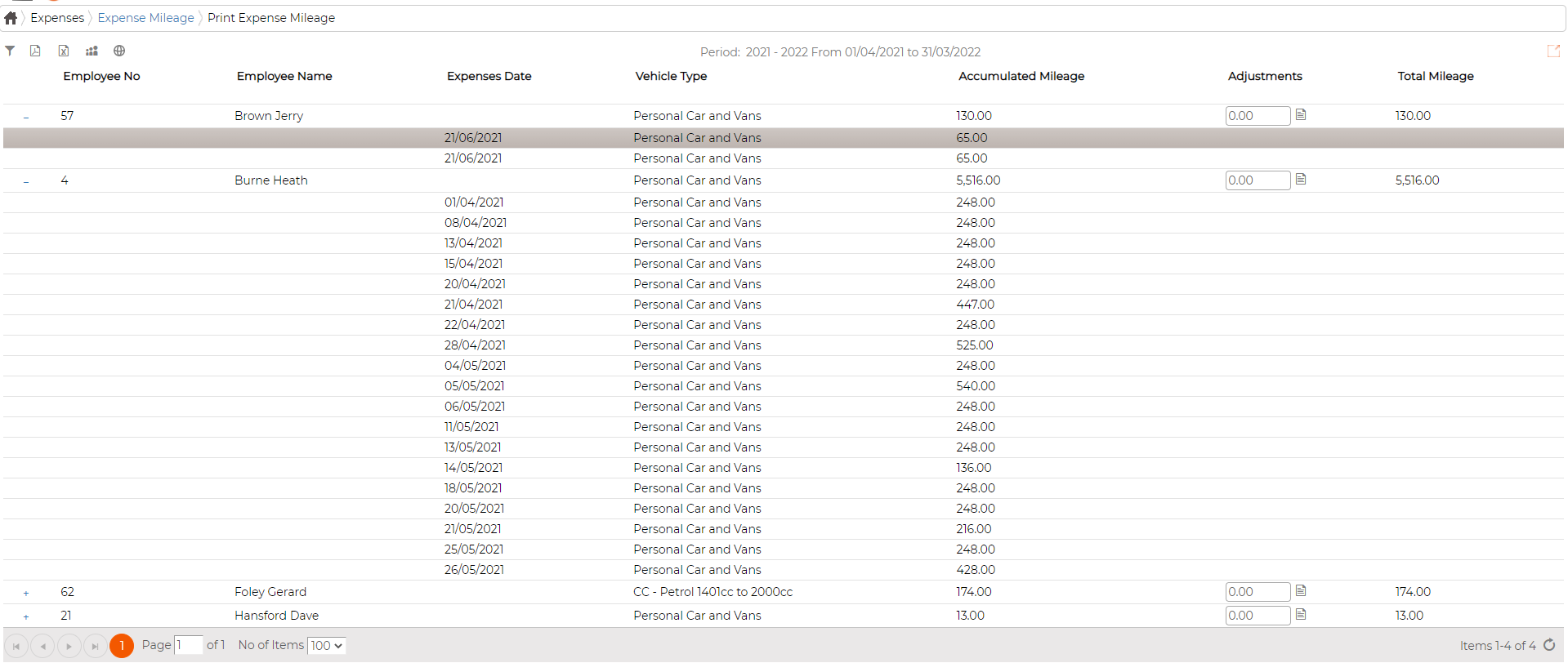
Screen allows user to view all the mileage claim submitted and approved for all employees into 1 single screen
It also displays the accumulated totals for each individual employee for the respective period
Calendar for the respective year must be created first before you can view the corresponding data

Add Expense Mileage
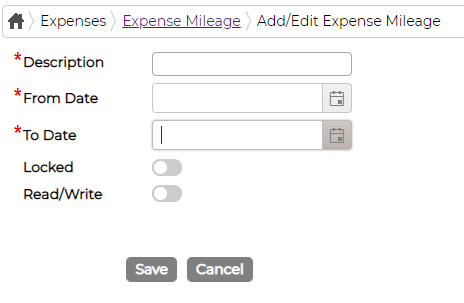
Click on icon to add new calendar and fill in data as required
View Data
Double click on the calendar to view data in details.
User also has an option to make adjustments to accumulated mileage if required.
Edit Expense Mileage
Click on icon against the item to edit existing Expense Mileage and fill in data as required
Delete Expense Mileage
Click on icon against the item to delete Expense Mileage.
It also displays the accumulated totals for each individual employee for the respective period
Calendar for the respective year must be created first before you can view the corresponding data
Add Expense Mileage
Click on
icon to add new calendar and fill in data as requiredView Data
Double click on the calendar to view data in details.
User also has an option to make adjustments to accumulated mileage if required.
Edit Expense Mileage
Click on
icon against the item to edit existing Expense Mileage and fill in data as requiredDelete Expense Mileage
Click on
icon against the item to delete Expense Mileage.