
Synergy App - Working against the Scheduled Activity
SynergyCorresponding Synergy App settings and icons must be setup before user can start using the Scheduled Activity option on Synergy App.
Please refer to Synergy App section for further details on how to setup!
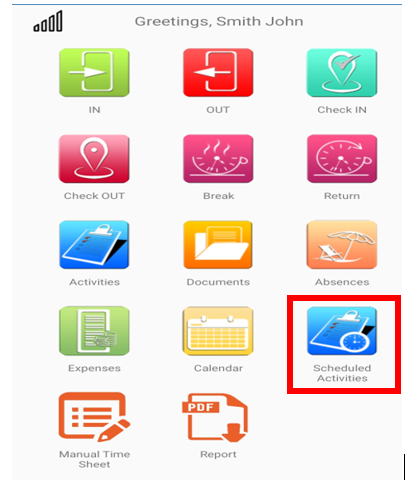
Users of the Synergy App will need to navigate to Scheduled Activity icon from Home screen
User will see the respective schedules for today, week and all with detailed information.
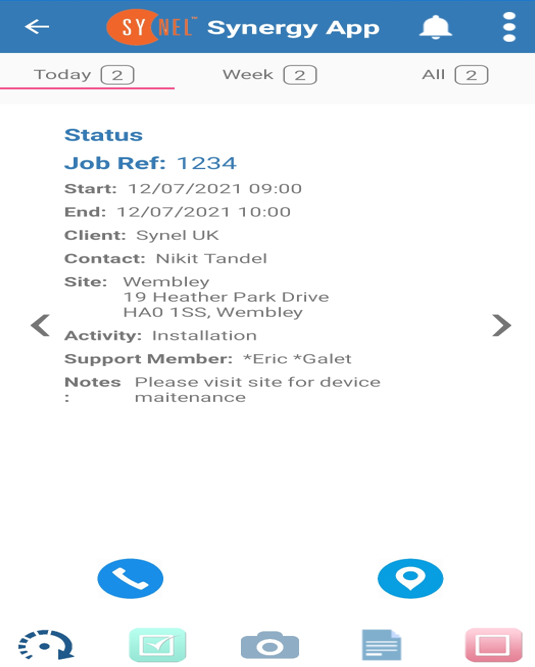
 icon will display the contact no of contact person on scheduled activity
 icon will open the map with the location tag of the site
 icon allows recording travel time against the scheduled activity
 icon allows to start the scheduled activity
 icon allows to record pictures against the scheduled activity
 icon allows to record notes and comments against the scheduled activity
 icon allows to end the Scheduled activity
All the information will be recorded when corresponding action is performed by the User and is visible under Menu - Activities - Daily Activities screen
Please refer to Synergy App section for further details on how to setup!
Users of the Synergy App will need to navigate to Scheduled Activity icon from Home screen
User will see the respective schedules for today, week and all with detailed information.
icon will display the contact no of contact person on scheduled activity icon will open the map with the location tag of the site icon allows recording travel time against the scheduled activity icon allows to start the scheduled activity icon allows to record pictures against the scheduled activity icon allows to record notes and comments against the scheduled activity icon allows to end the Scheduled activity All the information will be recorded when corresponding action is performed by the User and is visible under Menu - Activities - Daily Activities screen