
Synergy A Devices - Maintenance Screen
SynergyThis screen pushes data out to the Synergy A devices on site. Find it under Menu > Maintenance > Synergy A Devices. It has two tabs, By Devices and By Employees.
On the By Devices tab, each device has its own row showing its name and a count of unsuccessful sync attempts, with a set of actions: Sync Offline Data, Sync New Templates, Sync All Templates, Sync Firmware, Sync AppProperties, and Stop sync Firmware and AppProperties. Above the list, Sync all Templates to all Devices runs the template sync across every device at once.
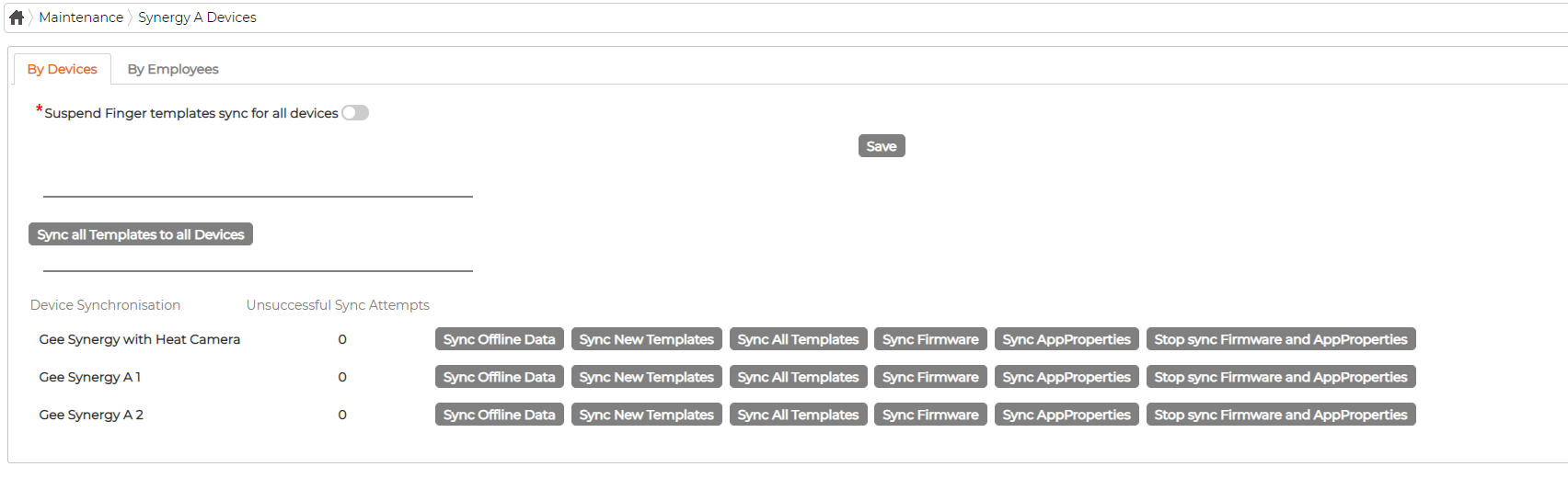
The Suspend Finger templates sync for all devices toggle at the top stops finger template syncing across the board until you turn it off again; click Save after changing it. The By Employees tab does the reverse by selection, syncing the templates and offline data of chosen employees out to all Synergy A devices.