
Breaks
System comes with 6 predefined Breaks.
Each break can be defined as Paid or Unpaid with specific time limits.

Click on icon against the break type to edit
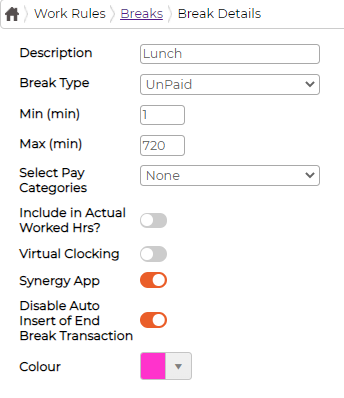
Each break can be defined as Paid or Unpaid with specific time limits.
Click on
icon against the break type to edit - Description - Provide description for the break
- Break Type - Select break type is Paid/unpaid from the drop-down menu
- Min - Minimum number of minutes
- Max - Maximum number of minutes
- Select Pay Category - Select pay category from the drop-down menu (if break is Paid)
- Include in Actual Worked Hr? - Switch on to include break time into actual worked hours
- Virtual Clocking - Switch On for break type to be available within Virtual Clocking
- Synergy App - Switch On for break type to be available within Synergy App
- Disable Auto Insert of End Break Transaction - Default is switched ON.
- Colour - Select default colour of the break type