
EPOS Tills
EPOSScreen allows defining the EPOS Till Application and its respective parameters

Add Till
Click on icon to add till
General Tab
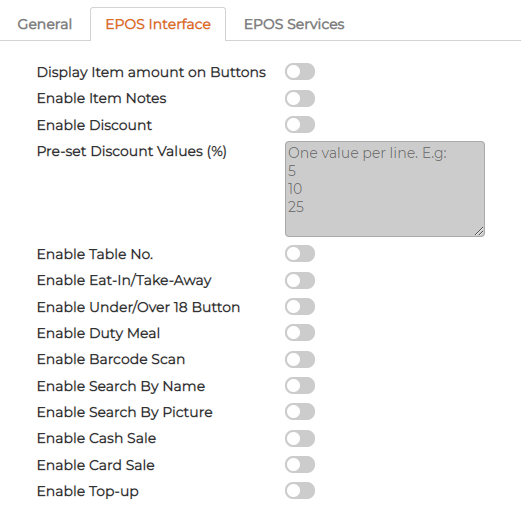
Switch items ON/OFF as required on the till application
EPOS Services
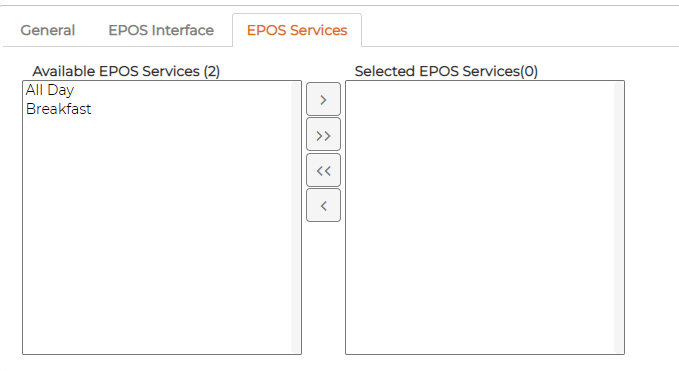
Select the services as required
Edit Till
Click on icon against the item to edit
Delete Till
Click on icon against the item to delete
Deleted item cannot be recovered
Add Till
Click on
icon to add tillGeneral Tab
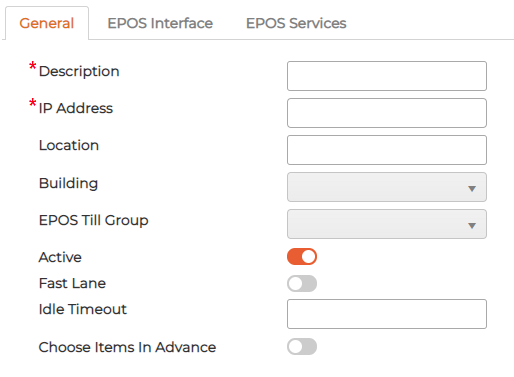
- Provide Description to the till
- Insert IP address
- Describe the location
- Select Building if required
- Select EPOS Till Group
- Switch Active ON/OFF as required
- Fast Lane - Switch ON if Till application needs to act as Fast Lane
- Idle Timeout - define Idle timeout for the application so that it logs out automatically
- Choose items in Advance - switch on if required before selected the Diner
Switch items ON/OFF as required on the till application
EPOS Services
Select the services as required
Edit Till
Click on
icon against the item to editDelete Till
Click on
icon against the item to deleteDeleted item cannot be recovered