
Contracts
A contract defines an employee's expected hours and the thresholds used to sort those hours into Contract Categories. Contracts are listed under Work Rules > Contracts, each with an Active toggle so you can retire one without deleting it.

Click the green plus icon above the list to add a contract, or the edit icon on a row to change an existing one. Set a Description and Contract Type, then complete the tabs. Contract Type switches the second tab between Weekly Contract and Monthly Contract.
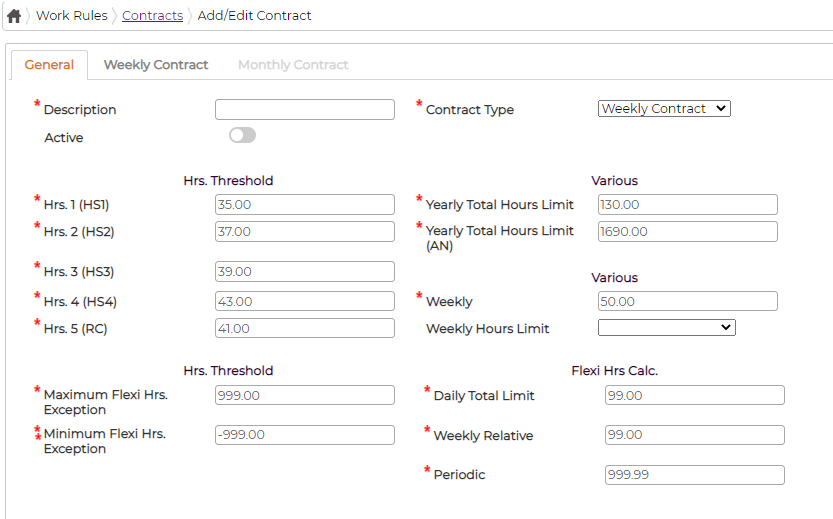
On the General tab, the Hrs. Threshold fields (HS1 to HS4 and RC) set the hour boundaries for the week, alongside the yearly and weekly limits and the flexi hours settings.
The Weekly Contract or Monthly Contract tab lists the ten Contract Categories. Each one takes a Formula that decides which hours fall into it, for example OvertimeBetweenThresholds(hs1,hs2) for the hours between thresholds HS1 and HS2, and an optional Cost Centre Distribution.
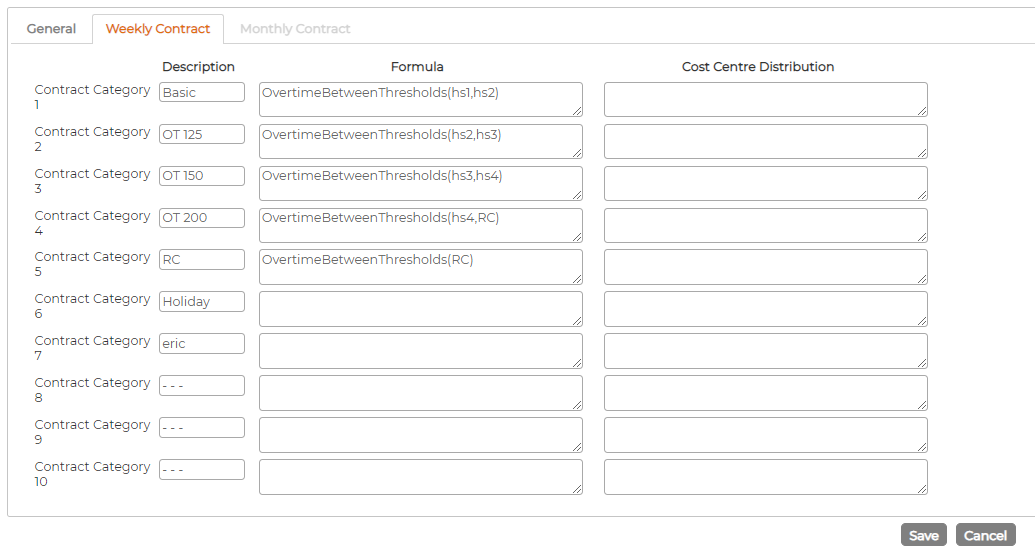
Getting the thresholds and formulas right is fiddly, so contact your Synel representative if you are setting up a new contract from scratch.